Preface
In the Unreal 5 version of UMG, the Button control has several new properties “Foreground”, refer to the figure below. Foreground is a common property in UI design, which mainly indicates what the foreground is. It can indicate color and texture. In the Button control, it is mainly used to affect the sub-content color added to the Button control.
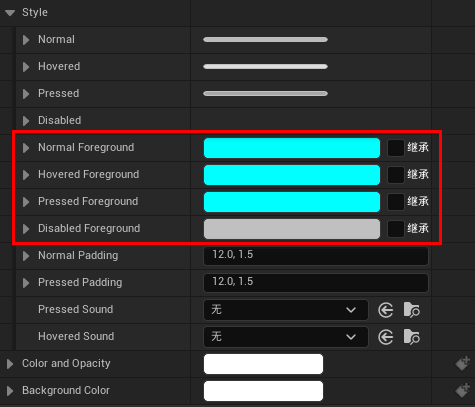 New properties in Button
Steps
1. Create a UMG page and add a button
2. Add a TextBlock control (text control) to the button
In the text control, we need to pay attention that if you adjust the color parameters of the text control panel, you can apply it to the text control, refer to the figure below.
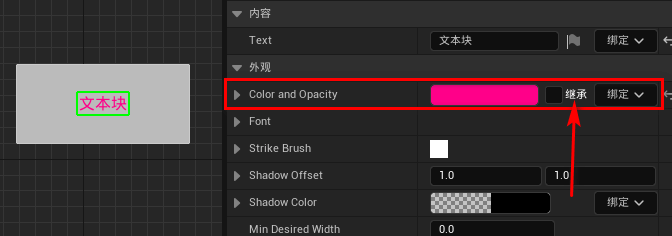 Adjust color
Here, the parent of the text control is the button control.
3. Check the color inheritance of the text control
Check the inheritance after the color in the text control, you will find that the originally set color is invalid, and the adjustment will not reflect the result, as shown in the figure below.
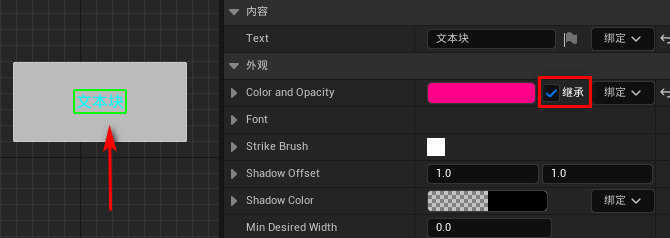 Check inheritance
4. Adjust the foreground color of the button control
Select the button control and adjust the foreground color in the button control. This color is applied to the subset node text control.
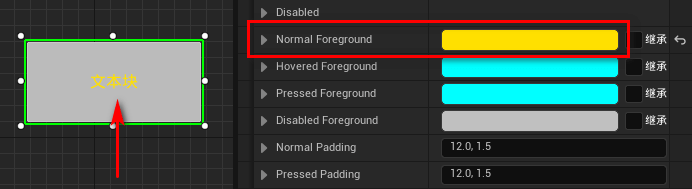 Set foreground color
Engine version: 5.2